New Export Feature - Progress Labels for Ticket Sub-Status Tracking

We're excited to announce that the Ed Controls PowerBI Connector now exports progressLabels - giving you deeper insights into ticket progress and sub-status tracking for your dashboards!
🎯 What Are Progress Labels?
Progress labels are sub-status indicators that provide granular visibility into where tickets stand in your workflow. While the main ticket status shows broad categories, progress labels reveal the specific stage of work within those statuses.
🚀 New Data Available in PowerBI
Progress Labels Export
We've added a new tickets_progress_labels table that stores progress markers for each ticket, linked via ticketid. This enables you to:
- Track workflow stages beyond basic open/closed status
- Identify bottlenecks in your ticket processing pipeline
- Monitor progress patterns across different ticket types
- Create detailed progress dashboards for stakeholders
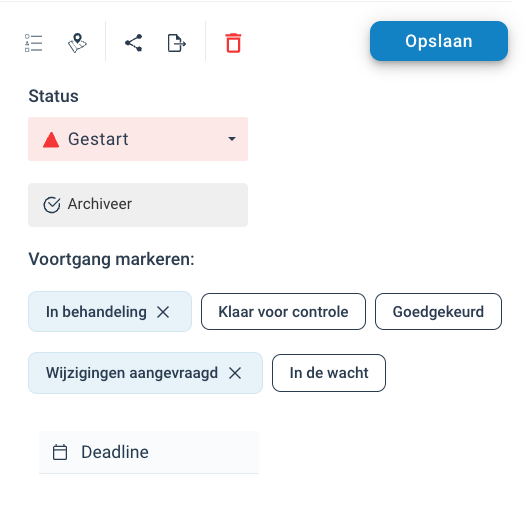
Example Progress Label Values
Based on the screenshot, common progress labels include:
- In behandeling (In progress)
- Klaar voor controle (Ready for review)
- Goedgekeurd (Approved)
- Wijzigingen aangevraagd (Changes requested)
- In de wacht (On hold)
📊 PowerBI Dashboard Opportunities
For PowerBI Consultants
This new data field opens up exciting dashboard possibilities:
-- Get ticket distribution by progress labels
SELECT
    tpl.progress_label,
    COUNT(*) as ticket_count,
    AVG(DATEDIFF(day, t.creationdate, NOW())) as avg_days_in_status
FROM tickets t
JOIN tickets_progress_labels tpl ON t.id = tpl.ticketid
GROUP BY tpl.progress_label
For Ed Controls Users
Create comprehensive progress tracking dashboards:
- Progress Distribution Charts: Visualize how tickets are distributed across different progress stages
- Workflow Bottleneck Analysis: Identify where tickets spend the most time
- Team Performance Metrics: Track how quickly tickets move through progress stages
- Historical Progress Trends: Monitor progress label changes over time
🔧 Implementation Examples
Progress Overview Dashboard
-- Tickets by progress label with time tracking
SELECT
    t.title,
    t.status,
    tpl.progress_label,
    t.responsible as assignee,
    DATEDIFF(day, t.lastmodifieddate, NOW()) as days_in_current_progress
FROM tickets t
JOIN tickets_progress_labels tpl ON t.id = tpl.ticketid
ORDER BY days_in_current_progress DESC
Progress Transition Analysis
-- Analyze progress patterns
SELECT
    tpl.progress_label,
    t.status,
    COUNT(*) as count,
    AVG(DATEDIFF(day, t.creationdate, t.lastmodifieddate)) as avg_resolution_time
FROM tickets t
JOIN tickets_progress_labels tpl ON t.id = tpl.ticketid
GROUP BY tpl.progress_label, t.status
📈 Dashboard Use Cases
Project Managers
- Monitor ticket progress across teams
- Identify workflow bottlenecks
- Track time spent in each progress stage
Team Leads
- Visualize team workload distribution
- Monitor review and approval queues
- Track progress label transitions
Stakeholders
- High-level progress visibility
- Workflow efficiency metrics
- Progress trend analysis
🎯 Getting Started
The tickets_progress_labels table is now automatically included in your dataset exports. Simply refresh your PowerBI dataset to start using progress labels in your reports and dashboards.
Quick Start Tips:
- Join progress labels with ticket data using
ticketidfor enhanced visibility - Create progress distribution visualizations to identify workflow patterns
- Build time-in-stage metrics to optimize your processes
- Set up progress-based alerts for tickets stuck in specific stages
💡 Pro Tips for Dashboard Builders
- Combine with existing status fields for comprehensive workflow tracking
- Use progress labels for drill-down functionality in your dashboards
- Create progress transition matrices to visualize workflow paths
- Monitor progress label frequency to optimize your workflow stages
The progressLabels feature is available now in all datasets. For technical questions or dashboard implementation support, contact us at support@edcontrols.com